Family Matters is a private, invitation-based service that families use to coordinate the practical work of caring for one another — running a household, keeping records of family loans and gifts, funding a child's education, and arranging for someone to watch over a home. This page describes our text messaging program in one place: how you opt in, what we send, how often, what it costs, how to stop, and what we will never do with your number.
This page is a summary for convenience. The binding terms are in our Terms of Service, Section 5 and our Privacy Policy, Section 7.
How you opt in
We do not buy or rent phone numbers, and we never text a list a third party gave us. A number reaches us only from the person themselves, or from a family member or service provider who has that person's permission under Terms Section 4, including when a service provider brings in their own client list from their accounting software. For your own number, there is one way to opt in, and it is the same on every door:
You enter your own mobile number in the “Mobile number or email address” field on a Family Matters sign-in screen and tap “Send sign-in code.” The disclosure below is displayed on that same screen, directly beneath the field and the button, before any message is sent:
By clicking “Send sign-in code,” you agree to the Terms of Service and Privacy Policy.
If you enter a mobile number, you agree to receive text messages from Family Matters — sign-in codes, household invitations, and account activity alerts. Message frequency varies. Message and data rates may apply. Reply STOP to opt out, HELP for help.
Entering an email address instead of a mobile number is always an option, and choosing texts is never a condition of using Family Matters or of any purchase.
The sign-in screen is live and publicly viewable at app.housematters.app and at homewatch.myfamilymatters.com (the operator door was renamed House Matters on August 15, 2026; both hosts serve the same screen). The same screen and the same disclosure appear on the family door at app.myfamilymatters.com and the advisor door at advisors.myfamilymatters.com — all three render one shared component, so the consent language is identical on every one.
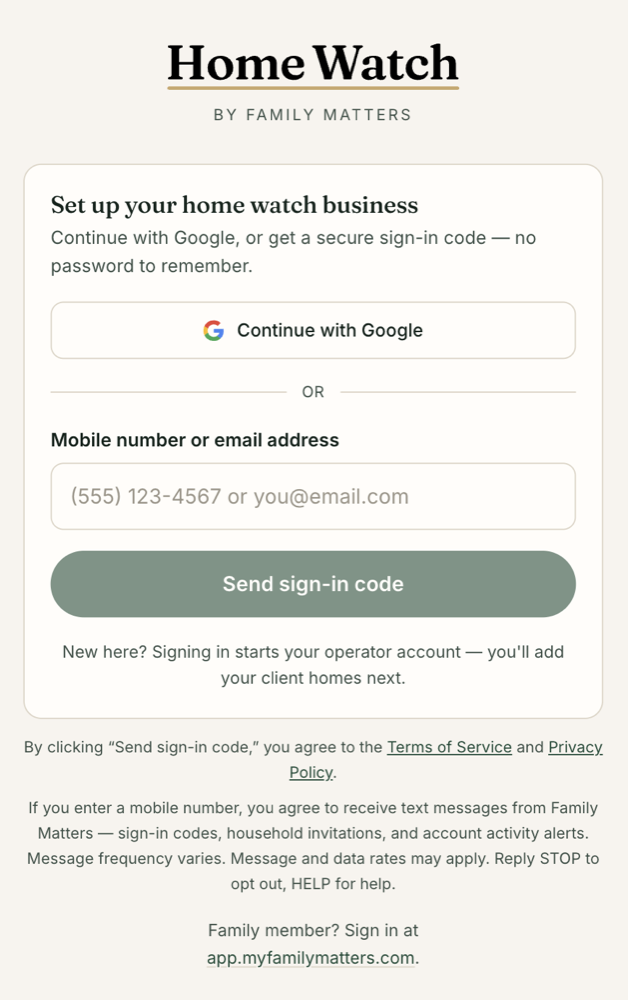
The live sign-in screen at homewatch.myfamilymatters.com, captured July 29, 2026.
Two related cases are worth stating plainly, because they involve someone else typing a number:
- Invitations. When a family member invites someone to a household, or a home-watch Operator sets up service for a homeowner, the inviter enters that person's mobile number. The inviter represents that they have the person's permission to do so, under Terms Section 4. The invited person may receive an invitation and one reminder, a resend if the inviter asks for it, and one notice when a service provider sends them a bill; each names Family Matters or House Matters, or the person or business who sent it, and they can reply STOP to any of them.
- Notification texts are on once you sign in with your mobile number. When you enter your own mobile number on the sign-in screen and agree to the disclosure above, activity notifications by text are on for your account; you can turn them off in your notification settings at any time, or reply STOP.
What we send
Account and service messages only. We send no marketing, no advertising, and no promotional texts of any kind. Messages fall into these categories:
- One-time sign-in codes, sent only when you ask for one
- Invitations to join a household, or to set up a home you own or care for
- A one-time welcome text after you sign up with a mobile number
- Updates from a visit to a home you own or care for, and questions and answers about that visit between a homeowner and their caretaker
- Billing notices from a service provider you work with: a bill, a payment request, or a reminder
- Reminders about tasks and reviews you have asked to be reminded about
Representative messages (texts about a House Matters home say House Matters; texts about a family say Family Matters):
- A sign-in code text from our sign-in provider that contains only your code.
- Abbey invited you to join the Halvorson family on Family Matters. Accept and set up your account: fmly.fyi/abc123 Reply STOP to opt out, HELP for help
- House Matters: Quinn checked the Lake House today. All clear. Report: housematters.app/r/abc123
- Sunrise Cleaning sent you a bill for $180 for the Lake House. Set up your House Matters account to see the visits behind it and pay. housematters.app/claim/abc123 Reply STOP to opt out, HELP for help
- House Matters: you're set up. Put House Matters on your phone: housematters.app/get Reply STOP to opt out, HELP for help
Message frequency
Message frequency varies based on your account activity and your notification settings. Most people receive only the sign-in codes they request. If you turn on activity notifications, frequency depends on what is happening in your household or at your home.
Message and data rates
Message and data rates may apply. You are responsible for any charges your wireless carrier imposes; these can vary and may be higher internationally. Carriers are not liable for delayed or undelivered messages.
How to stop, and how to get help
Reply STOP to any message to opt out of texts at any time. We also honor CANCEL, END, QUIT, UNSUBSCRIBE, REVOKE, STOPALL and OPTOUT. You will get one confirmation message and then no further texts.
Reply HELP or INFO for help, or reach a person at help@myfamilymatters.com.
Opting out of texts does not close your account and does not affect account emails or in-app notifications. If you opt out, the people who rely on reaching you through Family Matters — your household, or an Operator serving your home — may need to reach you another way, and we may let them know that texts to you have stopped.
Your number, and what we will never do with it
We will not share your mobile phone number or your SMS opt-in consent with third parties or affiliates for their marketing or promotional purposes.
Text messaging originator opt-in data and consent are excluded from every category of sharing described in our Privacy Policy; this information will not be shared with any third parties, other than the messaging aggregators and communications providers that carry the messages for us.
We do not sell, rent, trade, or transfer mobile opt-in data or consent to anyone, including affiliates and lead generators. Your consent is given directly to Family Matters, for this program only — it is not transferable or assignable to another business.
What we collect for this program is narrow: your mobile number, whether you have consented, and a record of the messages we sent you and when. We use it to deliver the messages described above, to keep the audit and delivery records we are required to keep, and for nothing else. Our full disclosure of what we collect and how we use it is in the Privacy Policy.
Contact
My Family Matters, Inc.
1010 Dale Street North
St. Paul, MN 55117
Text-message help and all other questions: help@myfamilymatters.com
The canonical version of this page is published at myfamilymatters.com/sms. Our Privacy Policy and Terms of Service are the binding documents.